Send invoices, quotations, receipts, job cards and other documents directly from any Windows application that can print.
No saving to PDF, searching through folders or manually attaching files.
If you can print it, you can send it.
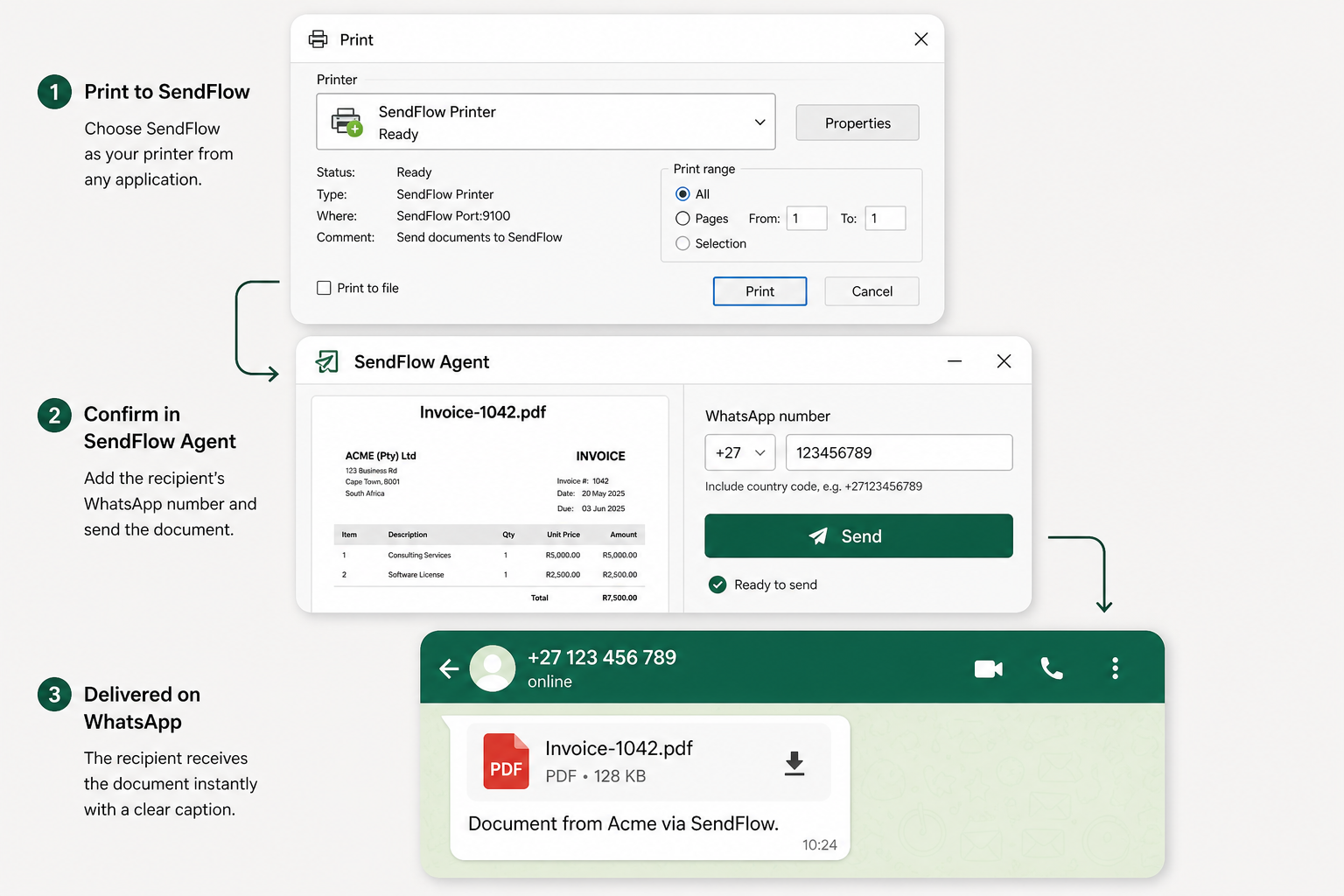
Give any printable Windows application a WhatsApp Send button.
Open a document and select SendFlow from the normal Windows Print menu.
Preview the PDF, choose a saved contact or enter a WhatsApp number, and confirm the send.
SendFlow securely sends the PDF and records the delivery result.
Print to PDF → choose a folder → name the file → open WhatsApp → find the recipient → browse for the attachment → send
Print → choose recipient → send
If a Windows application can print, it can usually work with SendFlow.
We do not claim compatibility with named third-party products unless tested in your environment.
Try SendFlow on one PC while we polish the Free experience for SMEs.
Messages are sent from a shared SendFlow number. Every delivery identifies the sender responsible for the document, and includes a report-abuse link.
Temporary document copies are deleted after delivery or automatically within 24 hours.
Documents are uploaded securely to EU-hosted infrastructure and used only for the delivery process.
No. The recipient receives the PDF through WhatsApp and does not need to install anything.
The Free plan uses a shared SendFlow delivery number. Every message identifies the business and sender responsible for the document.
The shared Free-plan delivery number is automated and replies are not monitored.
No. SendFlow is for expected transactional business documents. Bulk marketing, spam and unsolicited campaigns are prohibited.
Temporary copies are deleted after the final delivery result or automatically within 24 hours.
SendFlow records the failure and sends the user a delivery-failure alert by email.
Windows 10 and Windows 11.
If the application can print through Windows, it can usually work with SendFlow.